The YSU online tools a graduate nursing student uses
Youngstown State University's online nursing students work across a small set of systems: the Penguin Portal as the entry point, Self-Service Banner for registration, Blackboard Ultra for courses and the graduate nursing orientation site, Office 365 email, the Penguin PASS audit, Respondus and Examity for proctored exams, and Sentinel U for virtual patient work. This guide covers what each one does, where it touches your clinicals, and who helps when something breaks.
Get your placement plan
Tell us your YSU program and where you live. A placement advisor replies with preceptor and site options in your community that fit your YSU course.
The tools at a glance
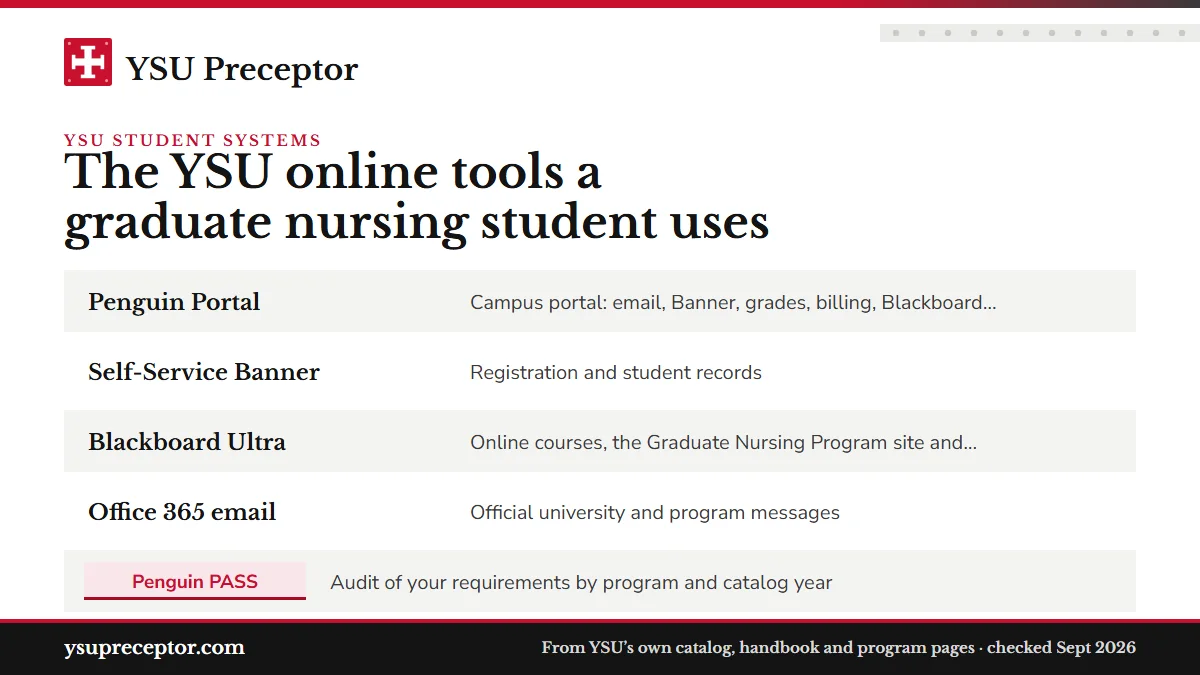
Most of these systems open from the Penguin Portal, and several matter more to your practicums than their names suggest. The clinical system itself, Exxat, has its own guide.
| Tool | What YSU uses it for | Why it matters for practicums |
|---|---|---|
| Penguin Portal | Campus portal: email, Banner, grades, billing, Blackboard, graduation application | Where you register for each practicum term |
| Self-Service Banner | Registration and student records | Your Banner address is where YSU mails your nursing ID badge |
| Blackboard Ultra | Online courses, the Graduate Nursing Program site and orientation module | Preceptor tips and your curriculum plan live here |
| Office 365 email | Official university and program messages | Policy changes and program notices arrive here |
| Penguin PASS | Audit of your requirements by program and catalog year | Shows the practicum sequence your catalog year carries |
| Respondus and Examity | Proctored testing | Needs a lockdown browser and a camera |
| Sentinel U | Required virtual patient platform for NP students | Bought before your first semester, kept active throughout |
| Y Card (Y app) | Photo for the YSU Graduate Nursing ID badge | No photo on file means no start to practicum |
| Exxat | Clinical compliance, placement and hour records | Every practicum document and log runs through it |
Penguin Portal and Self-Service Banner
The Penguin Portal is YSU's campus portal. YSU's IT pages describe it as secure, personalized access to Office 365 email, Self-Service Banner and campus information, and it is where students register for classes, check grades, pay a bill and reach Blackboard. The graduate handbook confirms that registration runs through it, and the graduation application sits there as well.
Banner carries two names at YSU. The IT page calls it Self-Service Banner, and the online FAQ's booklist instructions call it Banner Self-Service; both mean the same system. The FAQ's route to your course materials goes from the portal into Banner Self-Service, then Student, then Registration.
One Banner detail touches clinicals directly. YSU mails the graduate nursing ID badge to the address in Banner during your first didactic course, and it produces the badge only after you upload a photo to your Y Card through the Y app. The handbook says a student without that photo cannot begin practicum, so confirm your Banner address and photo in your first term, long before a practicum is scheduled.
Blackboard Ultra and the graduate nursing site
Blackboard Ultra is YSU's learning management system, designed for fully online courses, and every 7-week course you take runs there. YSU's teaching-technology guides also list Blackboard Collaborate, WebEx Meetings and Microsoft Teams for live sessions, so expect faculty to use one of them for synchronous meetings.
The graduate nursing program also keeps its own Blackboard site. The online FAQ sends students there for tips on securing a preceptor, and the handbook places each program's curriculum plan in the Graduate Nursing Orientation Module under Getting Started. Neither is public. Read the orientation module as soon as you have access: the curriculum plan shows which term each practicum falls in, and that term fixes every preceptor deadline that follows.
Those Blackboard tips describe the search YSU encourages you to lead. Our placement desk runs that search for you, finds a preceptor who fits the exact practicum, checks the fit against YSU's rules and hands you everything the preceptor request asks for. How it works walks through each step.
Student email and the Penguin PASS audit
YSU student email runs on Office 365, which also brings calendaring, contact storage and task tools. Incoming messages are scanned and filtered automatically, and the handbook says students learn of policy changes through their YSU address. During practicum terms, that inbox is where program and clinical faculty messages land, so check it as often as you check your work email.
Penguin PASS audits your completed work, remaining requirements and courses in progress against your declared program and catalog year. You reach it from the Student Dashboard card in the Penguin Portal, under the Records heading.
The catalog year matters more in nursing than most programs. The 2026-27 catalog lists five FNP practicums, NURS 7061 to NURS 7065, while students on older catalogs may still carry the earlier four-course sequence, NURS 7048 to NURS 7051, built around a 600-hour total. If your audit, your curriculum plan and the hours on YSU's program page do not agree, raise it with your advisor early; the FNP hours guide explains the 750 versus 600 conflict.
Proctored exams: Respondus and Examity
YSU's teaching-technology page groups its exam tools under one heading, test proctoring with Respondus and Examity, and links a Respondus student guide written for Blackboard Ultra. Respondus supplies the LockDown Browser; Examity is the second proctoring service YSU names.
The nursing FAQ is specific about equipment: students need access to a lockdown browser with a camera. Set both up on the computer and internet connection you will actually test from, run a practice check before your first proctored exam, and take any problem to the IT Service Desk while there is still time to fix it. A laptop borrowed from work may block software installs, so plan for a device you control. The public pages do not say which nursing courses use proctored exams; each course's Blackboard syllabus will.
Sentinel U, the required purchase
The 2026-27 graduate handbook calls Sentinel U a required educational platform for every student in the nurse practitioner programs. YSU names two parts of it, Virtual Client Encounters and Readiness Essentials: Advanced.
Students purchase Sentinel U themselves before the start of the first semester and must keep the account active for the whole of their enrollment. YSU's public pages give no price, so look for the cost in the purchase instructions your program provides and plan for it before your first term begins.
Sentinel U sits alongside your practicums rather than standing in for them: its Virtual Client Encounters happen on screen, while practicum hours still come from real patients under an approved preceptor. Finding that preceptor for each 7-week practicum is the part we take on, early and in order, so the platform work and the clinical work move together.
The IT Service Desk and other help
The IT Service Desk, on the fourth floor of Maag Library, is the place for trouble with the portal, email, Blackboard or proctoring tools. The online FAQ also calls it Tech Services and the Tech Desk, so all three names point to the same office. The same building houses the Writing Center and the Comprehensive Testing Center, so most campus-based academic help sits under one roof.
For registration, book orders and general university questions, the Penguin Service Center in Meshel Hall is YSU's front desk. Clinical questions go elsewhere: Exxat, preceptor approvals and practicum paperwork belong with your clinical faculty and the Graduate Clinical Coordinator, and the compliance requirements guide lists what the clinical file needs. For writing, research and wellbeing support, see library and academic support, and for term dates, the academic calendar.
Questions YSU students ask
Does the Penguin Portal show my clinical approvals?
Not by YSU's description of it. The portal covers registration, grades, billing, email and Blackboard. Clinical compliance, placement and hour records sit in Exxat, which the 2026-27 graduate handbook names as YSU's official clinical system. The older online FAQ describes approval notices arriving through a Medatrax mail center; treat that as an earlier setup and follow Exxat unless your clinical faculty says otherwise.
Can I forward my YSU email to a personal account?
Not automatically. YSU has disabled auto forwarding of student email to other systems, so a forwarding rule will not carry program messages across. Because the handbook announces policy changes through your YSU address, read that inbox directly, or add it to the mail app on your phone, especially during practicum terms.
Is Sentinel U required for YSU's Nursing Education track?
The handbook states the Sentinel U requirement for students in the nurse practitioner programs, meaning the FNP and AGACNP options. It does not say the same about Nursing Education, so ask your advisor before buying it if you are in the MSN or certificate Nursing Education program.
When is YSU's IT Service Desk open?
YSU lists fall and spring hours of 7:30 a.m. to 7 p.m. Monday through Thursday, 7:30 a.m. to 5 p.m. on Friday and 9 a.m. to 5 p.m. on Saturday. Summer hours may differ, so check the IT Service Desk page before a late-evening exam or assignment deadline.
Do I have to come to campus for any YSU online nursing tools?
YSU's catalog describes the MSN and certificates as fully online, and no on-campus immersion appears in the catalog, handbook or FAQ. The ID badge arrives by mail. The handbook does mention on-campus or virtual activities as directed by course faculty, and clinical faculty may evaluate you through site visits or virtual evaluations.
Related pages
Last checked 2026-09-26
We check these pages against YSU's own catalog, graduate handbook, online program pages and FAQ, and Ohio rules. Your clinical faculty, the Graduate Clinical Coordinator and your advisor have the final word.
YSU asks you to secure your preceptor. We find one near you.
Tell us your YSU track, where you live and when your next practicum starts. We find preceptors near you who fit the practicum, check YSU's rules and hand you what the preceptor request needs, two months ahead, with the next term's preceptor already in view.
- Primary care preceptors for FNP practicums
NURS 7061toNURS 7065, acute care for AGACNPNURS 7071toNURS 7075 - Outside your own unit and away from your supervisor, in a state YSU accepts
- Across Ohio, from the Mahoning Valley to Cincinnati, and in Pennsylvania, West Virginia and Michigan
Start your placement plan
Program, city and start date is all we need to begin.